Telephony
Business SIP trunking built around your calls.
Connect your PBX to reliable SIP carriers, reduce unnecessary telephony costs, improve call resilience and keep your business numbers working when your primary trunk fails.
We do not resell trunks. We work out which carrier suits your real call mix, configure it against your PBX, and make sure your numbers are not arriving at the other end labelled as spam.
Carrier-independent configuration
We are not tied to one carrier, so the comparison starts with your traffic rather than a reseller agreement.
SIP trunk failover
Primary and secondary trunks, with routing rules that move calls when a carrier stops answering.
Number porting support
CSR checks, documentation and a rehearsed port date before any number moves.
FreePBX and PBX integration
Trunks, routes and dial patterns configured on FreePBX, Asterisk and other SIP capable systems.
What Is SIP Trunking?
A SIP trunk is the connection that carries your business phone calls between your phone system and the public telephone network over the internet, rather than over ISDN or analogue lines. The trunk is supplied by a SIP trunk provider and terminates on your PBX, the software or appliance that runs your business phone system.
The chain is simpler than the terminology suggests. Your business phone numbers sit with a carrier. That carrier delivers calls for those numbers down a SIP trunk connection over your internet circuit. The trunk registers to, or peers with, your PBX. The PBX then decides which extension, ring group or queue the call belongs to, and the call arrives at a desk phone, a softphone or a call centre agent. Outbound VoIP calls take the same path in reverse.
Because VoIP trunking is a configured connection rather than physical wiring, capacity becomes a question of concurrent call limits, bandwidth and codec choice instead of how many lines are installed. It is also why a business SIP trunk can be resized, split across two providers or moved to another carrier without replacing the phone system behind it.

Why Use SIP Trunking for Your Business Phone System?
The reasons businesses move to a business SIP trunk are usually practical rather than technical.
Lower telephony costs
Route calls through carriers selected according to your actual destinations and call volume, rather than a headline per minute rate.
Flexible call capacity
Scale concurrent calls up or down without replacing the PBX infrastructure you already run.
Keep your existing PBX
Connect SIP trunks to compatible systems such as FreePBX, Asterisk and other SIP enabled PBX platforms.
Business continuity
Use more than one carrier, with automatic failover, to reduce dependence on a single trunk.
Number porting
Move existing business numbers across while the current trunk stays active during the transition.
Better call visibility
Use call records and routing information to understand where your telephony costs are actually going.

Your SIP Trunk Should Match Your Call Traffic
Rates that look identical on a homepage diverge sharply once your actual destination mix is applied to them. We compare Telnyx, VoIP.ms and Twilio against your own call detail records rather than their headline per-minute price, and show you the pass-through cost at each provider published rate.
Then we normally configure two carriers, with automatic failover and least cost routing between them. Every carrier page argues for a single provider. We have no reason to.
- Carrier comparison run against your own call records, not a headline rate
- Dual trunk configuration with automatic failover and least cost routing
How the comparison works
Analyse your call records
We take a sample of your call detail records and break it down by destination, duration and time of day.
Compare carrier rates
Your own traffic is priced against the published rates of the carriers that suit those destinations.
Configure the best routing strategy
Least cost routing, failover order and number requirements are agreed before anything is bought.
Carrier selection depends on destinations, call volume, number requirements, routing and business continuity requirements. There is no single carrier that is right for every business.
How Much Could Your SIP Trunk Actually Cost?
We do not publish a price per minute, because a per minute figure on its own tells you very little about what a business SIP trunk will cost you. SIP trunk pricing follows the shape of your traffic, so these are the things that actually move the number.
- Destination countries and the mix of local and international calls
- Concurrent call capacity at your busiest hour
- Inbound numbers, including how many DIDs you hold
- Outbound call volume and average call duration
- Carrier rates and the billing increments behind them
- Whether you want a second carrier for failover
- Number porting requirements and timing
- Monitoring and support once the trunk is live
| Factor | Basic setup | Business setup |
|---|---|---|
| SIP trunk | Single | Primary and failover |
| Carrier | One | Multiple |
| Routing | Standard | Least cost routing |
| Failover | Limited | Automatic |
| Number porting | Optional | Supported |
| Monitoring | Basic | Ongoing |
We do not publish example prices, because a figure invented for a web page is not a quote. The numbers we give you come from your own call records priced against the carriers we would actually recommend.
How We Connect Your SIP Trunk to Your PBX
A SIP trunk is only as reliable as the path around it. This is the architecture we normally deploy, from the carrier down to the handset on the desk.
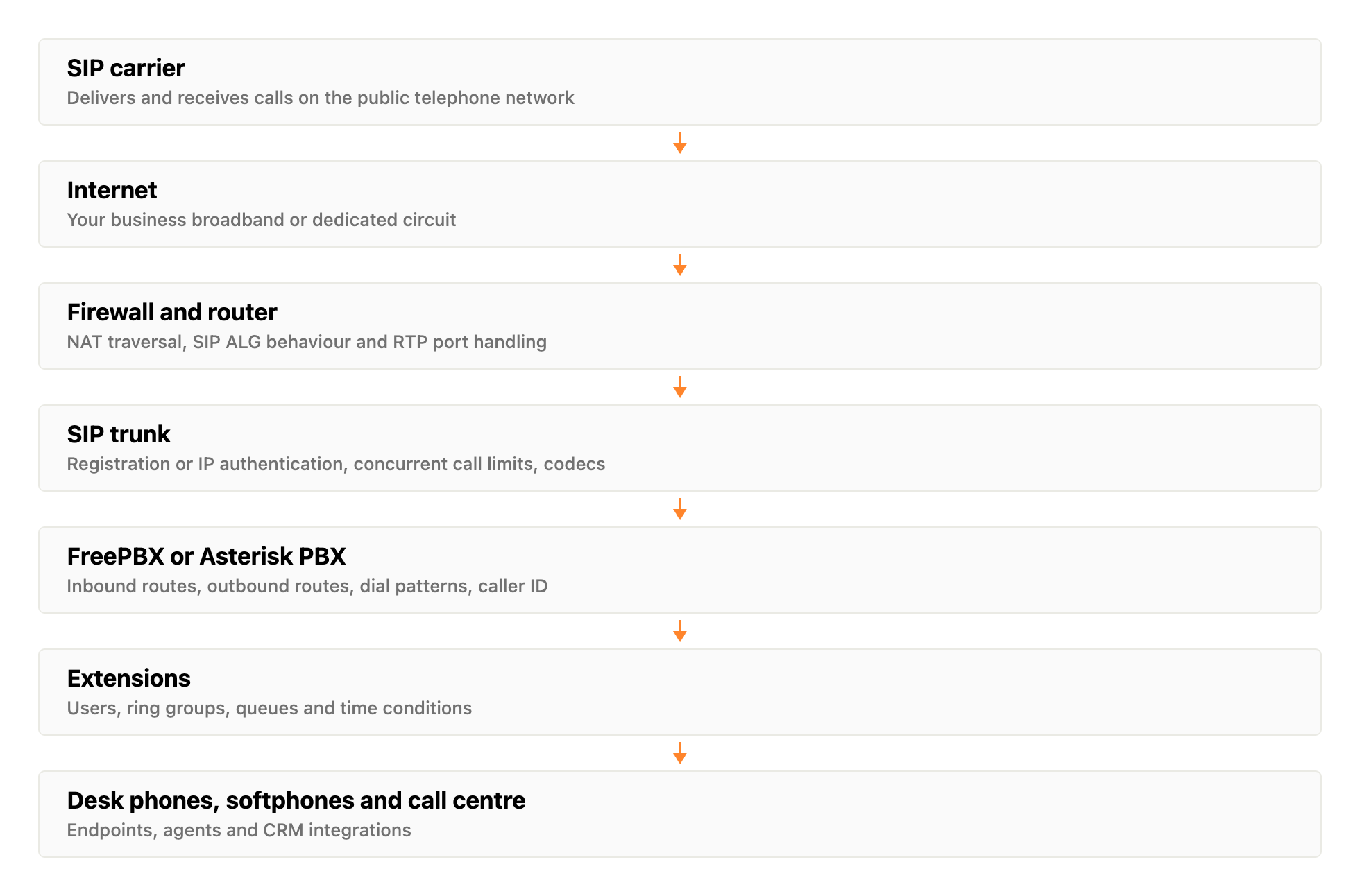
SIP carrier
The provider that terminates your outbound calls on the public network and delivers inbound calls to your numbers.
Firewall and router
NAT behaviour, SIP ALG and RTP port ranges are settled here, since most one way audio problems start at this layer.
SIP trunk
Registration or IP authentication, concurrent call limits, codec list and the caller ID you are allowed to present.
FreePBX, Asterisk or another VoIP PBX
Inbound routes, outbound routes, dial patterns and caller ID handling all live on the PBX.
Extensions and queues
Users, ring groups, time conditions and queues that decide who a call actually reaches.
SIP phones, softphones and call centre
Desk phones, softphones and agent software, with CRM integrations where a call needs to open a record.
Where the phone system has to talk to other software, that work is covered under CRM development and API integration, and the wider build under VoIP development and custom telephony.
SIP Trunking for FreePBX
Most of the SIP trunks we configure end up on FreePBX. The work is the same each time: build the trunk, prove SIP registration, then make the routing behave the way the business expects.
- SIP trunk configuration, registration and trunk authentication
- Outbound routes and dial patterns that match your numbering plan
- Inbound routes, DID mapping and caller ID handling
- Codec selection and NAT settings for the connection you actually have
- Failover trunks and number porting on the same PBX
See how we handle FreePBX integration and SIP based PBX systems.
SIP Trunking for Asterisk-Based Systems
On plain Asterisk, or a custom dialplan built on it, the same trunk is defined in configuration rather than through a web interface. That suits systems where call handling has been written rather than clicked together.
- SIP authentication, whether by registration or by IP
- Inbound routing into your existing dialplan contexts
- Outbound routing, prefix handling and CLI presentation
- Codec negotiation and NAT or firewall considerations
- Failover between carriers, with monitoring of trunk state
Custom dialplan and integration work sits under VoIP development, including AI call centre deployments.
What Happens When Your SIP Provider Goes Down?
Every SIP carrier has outages. The question is whether yours takes your inbound calls with it. When a single trunk carries everything, an outage at the provider is an outage for your business, and there is usually nothing to do but wait for someone else to fix it.
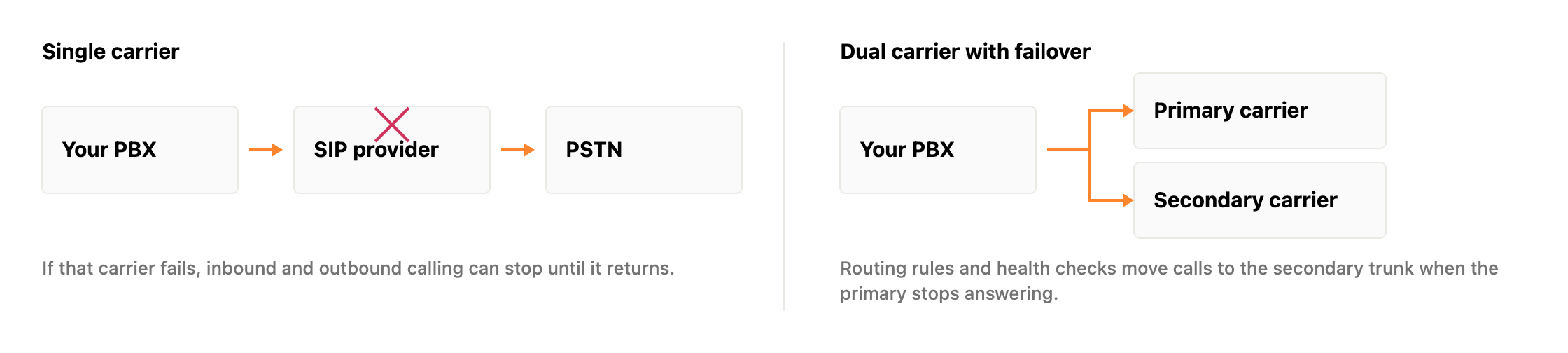
Single carrier
PBX to SIP provider to PSTN. One path out and one path in. If the carrier stops answering, outbound calls fail and inbound calls have nowhere to be delivered, however healthy your PBX is.
Dual carrier
PBX to a primary carrier, with a secondary carrier behind it. Outbound routes try the next trunk in order, and inbound numbers have an alternative path, so a carrier problem does not become a company problem.
- Automatic failover, so the PBX moves to the secondary trunk without anyone logging in
- A secondary carrier on a separate network, not a second account with the same provider
- Routing rules that order outbound trunks rather than failing on the first attempt
- Health checks on trunk state, so a failure is detected rather than reported by a customer
- Business continuity routing, sending inbound numbers onwards if both paths are unavailable
Keep Your Existing Business Numbers
Porting is where most cutovers go wrong: a customer service record that does not match, a letter of authorisation rejected over an address typo, a port date nobody rehearsed. We pull the CSR first, validate the E911 service address before cutover rather than after, and keep the existing trunk live until the new one is proven.
The rollback trigger is agreed before the port date, so if it goes badly the decision is already made rather than improvised at four in the afternoon.
- CSR pull, letter of authorisation, and a rehearsed port date
- E911 service address validated and registered before any number moves


How a number port runs
Collect number information
Numbers, current provider, account details and the exact billing address held on the account.
Validate customer service records
The CSR is pulled and checked against what the losing carrier holds, before anything is submitted.
Prepare porting documentation
Letter of authorisation and porting request prepared so every detail matches the CSR.
Schedule the port
A port date is agreed with the gaining carrier, with the rollback decision made in advance.
Test the new trunk
Inbound, outbound, caller ID and routing are tested on the new trunk before any number moves.
Complete the cutover
Numbers move, routing is checked on live calls, and the old service is stood down only once calls are proven.
Where it is technically and operationally possible, the existing service stays active until the new configuration has been tested. Not every number or every country can be ported, and that is something we check before a date is agreed rather than after.
Protect Your Business Caller ID Reputation
A trunk that is technically perfect is still failing you if your calls arrive labelled as spam. We check the STIR/SHAKEN attestation level your calls actually carry rather than trusting carrier marketing, register CNAM, and monitor how the major networks label your numbers over time.
The regulatory floor is moving here. The FCC has proposed extending robocall mitigation obligations beyond carriers to businesses running their own PBX or dialling platform, which would cover a lot of companies currently assuming none of it applies to them.
- Attestation level verified on live calls, not assumed from the carrier
- CNAM registration and ongoing spam label monitoring across major networks
The number you present has to be one your carrier is willing to attest for. In the United States that attestation level, A, B or C under STIR/SHAKEN, travels with the call and feeds into how the terminating network treats it. CNAM controls the name shown against your number where the receiving network looks it up. On top of both, the analytics engines used by the mobile networks apply their own spam labels based on calling patterns, call durations and complaint data.
We can check the attestation your live calls actually carry, register CNAM, and monitor how the major networks are labelling your outbound numbers. What nobody can offer is a guarantee that a call will never be labelled, because that decision sits with the receiving network rather than with your SIP trunk provider.
SIP Trunking for Modern Business Phone Systems
The setups below are the ones that come up most often in the work we do.
Small businesses
A handful of numbers, one trunk and a phone system that has to stay understandable to whoever manages it.
Growing companies
Call capacity that moves with headcount, without buying a new phone system every time a team is added.
Call centres
Concurrent call volume, queue behaviour, outbound caller ID and number reputation all matter at once.
Multi-location businesses
Sites that share numbering, routing and trunks instead of each buying their own lines locally.
FreePBX and Asterisk deployments
Existing installations that need trunks configured, corrected, or split across two carriers.
Businesses replacing legacy phone systems
Moving off ISDN or an ageing on premise system while keeping the numbers customers already dial.
Our SIP Trunking Process
SIP trunking is an engineering job rather than a purchase. This is the order we work in, and roughly what happens at each stage.
Understand your calls
Destinations, volumes, numbers, concurrent call peaks and what your PBX is currently doing.
Compare carriers
Relevant carriers priced against your actual traffic rather than against a headline rate.
Design the trunk
Routing strategy, resilience, number plan and how the trunk will authenticate.
Configure your PBX
SIP trunks, inbound and outbound routes, dial patterns, caller ID and codecs.
Test before cutover
Inbound, outbound, caller ID, failover and number routing tested while the old service still runs.
Go live
The cutover is completed and the trunk is monitored while the traffic settles.
Common SIP Trunking Problems We Troubleshoot
These are the faults we are called in for most often, whether or not we configured the trunk originally.
Why are my SIP calls failing?
Most failures come down to one of four things: the trunk is not registering, the carrier is rejecting the credentials or source IP, the outbound route is sending a number format the carrier will not accept, or the firewall is blocking signalling. The SIP response code narrows it quickly. A 403 usually points at authentication or permissions, a 404 at dial pattern or number format.
Why can I receive calls but not make them?
Inbound working means registration and the carrier side are broadly healthy, so the problem is on the outbound path. Common causes are an outbound route that does not match the number dialled, a dial pattern adding or stripping a digit, an unauthorised caller ID being presented, or a credit limit or destination restriction on the carrier account blocking those numbers.
Why can I make calls but not receive them?
Outbound proves the trunk works, so inbound points at how calls reach you. Either the number is not routed to that trunk at the carrier, the inbound route on the PBX does not match the DID format the carrier is sending, or the registration has dropped and the carrier has nowhere to deliver the call to.
Why is my caller ID incorrect?
The number leaving your PBX and the number the carrier is willing to present are two different things. If the outbound caller ID is not on the account, many carriers substitute the main number or reject the call outright. Check the CLI set on the extension, any trunk level override, and which numbers the carrier has authorised for presentation.
Why are my calls being labelled as spam?
Labelling is decided by the receiving network and the analytics engines behind it, not by your trunk. Low attestation, an unregistered CNAM, a sharp increase in outbound volume, very short call durations and complaint data all feed into it. Improving it is usually a combination of attestation, CNAM registration and changing the calling pattern itself.
Why does SIP registration keep failing?
Repeated registration failures normally trace to credentials, NAT or timing. Check the username, password and registration string first, then whether the firewall is closing the signalling port between registrations, and finally the registration interval itself. Where the carrier supports IP authentication, moving away from registration removes the problem rather than tuning it.
Why is there one-way audio?
Signalling is arriving but RTP is not flowing in both directions. That is almost always NAT or firewall related: SIP ALG rewriting packets in transit, no external address configured on the PBX, the RTP port range not open, or a media path that assumes both ends can reach each other directly when they cannot.
Why does SIP work internally but not externally?
Internal calls never leave your network, so they prove very little about the trunk. When external calling fails, the difference is the path out: the external address configured on the PBX, the local networks it recognises, firewall rules for signalling and media, and whether the carrier can reach the address you are presenting to it.
Why does my SIP trunk stop working behind a firewall?
SIP ALG is the usual culprit. It rewrites SIP headers in transit and frequently breaks registration and media in ways that look random. Aggressive UDP timeouts also close the pinhole the PBX depends on between keepalives. Disabling ALG, opening the RTP range and matching keepalive intervals to the firewall timeout normally settles it.
Why do calls fail when my primary SIP provider goes down?
Because nothing has been told to try anywhere else. Outbound routes need more than one trunk in priority order, inbound numbers need a secondary path configured at the carrier, and trunk state needs monitoring so the failover is triggered rather than discovered the following morning.
SIP Trunking FAQs
Common questions about SIP trunks, providers, porting and PBX compatibility.
What is a SIP trunk?
A SIP trunk is a connection between your phone system and a carrier that carries voice calls over the internet instead of over physical phone lines. It handles both inbound calls to your business numbers and outbound calls from your extensions.
How does SIP trunking work?
Your numbers sit with a carrier. The carrier sends calls for those numbers over the internet to your PBX using the SIP protocol, and the PBX routes each call to the right extension, ring group or queue. Outbound calls follow the same path in reverse.
How much does SIP trunking cost?
It depends on your destinations, call volume, how many concurrent calls you need, how many inbound numbers you hold and whether you want a second carrier for failover. We price it against your own call records rather than quoting a per minute figure that may have nothing to do with your traffic.
Do I need a SIP provider?
You need a carrier to reach the public telephone network. What you do not need is to accept whichever provider is put in front of you. We compare providers against your traffic and configure the trunk, whoever you end up buying it from.
Can SIP trunks work with FreePBX?
Yes. FreePBX is one of the most common systems we configure trunks on, including trunk authentication, inbound and outbound routes, dial patterns, codecs and failover. Our FreePBX integration page covers that work in more detail.
Can SIP trunks work with Asterisk?
Yes. On plain Asterisk the trunk is defined in configuration and routed through your existing dialplan contexts. Everything a FreePBX setup does through its interface can be done directly, which suits systems where call handling has been written rather than configured.
Can I keep my existing phone numbers?
In most cases yes, through number porting. We pull the customer service record, prepare the documentation and schedule the port with the existing service still running. Portability is not guaranteed for every number or every country, so we check before committing to a date.
How many simultaneous calls can a SIP trunk support?
That is a configured limit rather than a physical one. It depends on the channel limit agreed with the carrier, the bandwidth available on your circuit and the codec in use. Capacity can normally be increased without changing the phone system behind it.
Can I use multiple SIP providers?
Yes, and for most businesses that matters more than the rate. Two carriers on the same PBX give you a path to fall back to, and let you send different destinations down whichever trunk prices them better.
What happens if my SIP provider goes down?
With a single trunk, calls stop until the carrier recovers. With a secondary carrier and routing rules in place, outbound calls move to the second trunk and inbound numbers can be redirected, usually without anyone having to intervene.
Can you configure SIP trunk failover?
Yes. In practice that means a second carrier, outbound routes in priority order, inbound failover configured at the carrier, and monitoring of trunk state so a failure is detected rather than reported to you by a customer.
Can SIP trunks reduce business phone costs?
They often do, particularly when replacing ISDN or when the current carrier does not suit the destinations you call. Whether they will in your case depends on your call mix, which is why we start from your call records rather than from a promise.
What is STIR/SHAKEN?
A framework used in the United States to sign outbound calls with an attestation level, indicating how confident the originating carrier is that the caller is entitled to use that number. Terminating networks use it, among other signals, when deciding how to treat a call.
Why are my business calls being marked as spam?
Usually a combination of low attestation, no CNAM registration, and calling patterns that look like a campaign to the analytics engines the mobile networks use. It can be improved, but no provider can guarantee that a network will never label a call.
Do I need to replace my existing PBX?
Not if it speaks SIP. FreePBX, Asterisk and most modern IP PBX platforms accept SIP trunks directly. Replacement is only worth discussing when the system is out of support or cannot do what the business now needs.
Not Sure Which SIP Trunk Setup You Need?
Send us your PBX details and a sample of your call traffic. We can work out which carrier, routing strategy and failover configuration make sense for your business, and we will tell you plainly if the setup you already have is fine as it is.